Usage of resources

The magic potion pot is among the ways the user can use and spend resources on. Creating the magic potion pot is a part of the initial tutorial and will look something like this:

Make a magic potion pot for creating items!

Requirements: 5 Fire Herbs and 3 Magic Crystals

On complete: “You’ve unlocked the magic potion pot! Use it to not only make potions but to make various and different mystery items. Do more quests to unlock more recipes for the magic potion pot”.

The magic potion pot can be used to create all sorts of items like potions, cosmetic items, upgrades etc. A recipe needs to be followed to in order to create an item, or else the magic potion pot will return garbage if the resource combination does not exist. The two types of recipes are individual recipes and public recipes. Individual recipes are recipes that requires different resources per user. Public recipes however requires the same resources for everyone so that someone who has unlocked a public recipe may share it with other users.

Recipes can be unlocked by completing quests. Here is a typical example:

“I’ve made some Clarity Cookies at Outpost Bravo, but I was distracted by Rainbow Rats on the way to the fort so I lost them on the way. Could you go and fetch them for me?”
Reward: 5 number of Clarity Cookies and Clarity Cookie recipe.

This game mechanic plays a lot on Malone’s Theory of Intrinsic Motivating Instructions. The quests acts on the hidden information and random factor, and that itself invokes curiosity for the user. This is also a part of the fantasy that revolves around creating items in a magic cauldron with resources gathered from different outposts.

  • Edvin Gammelsæter


The Quiz

Our app starts off with a short quiz. The quiz will determine how the player will use the app initially. The first question is about gender, age, height and weight and the second is about how experienced/active the user is physically. This will decide the base intensity for the user. The preferred intensity will be a variable that decides the level of intensity based on the base intensity. Then there are other questions like if the user want to focus on weight loss and/or has a bike that is often used. The app will strive to streamline itself to accommodate those needs.

The Quiz’s purpose is mainly to find a suitable start intensity for the user, but it is also useful for estimating how quickly the user is able to progress physically. Older people may not be able to progress physically as fast as young people for example. People who have experience beforehand but have been sedentary for a while may also have an advantage, and other people who are still active physically may be close to plateauing and are already at a high level of intensity but are progressing very slowly.

The surroundings also plays a big role as that affects how the user will be placing the outposts. Someone who lives on the country-side may be limited on how many roads to walk on and places the user can place outposts on compared to someone who lives in a city. How this will be balanced is a limit on outposts. Countryside outposts are more limited than city outposts but are more effective and stronger since there are fewer of them.

  • Edvin Gammelsæter

Comparing similar idéas and Fort Fitness’ use of AR-technology

https://link.springer.com/article/10.1007/s11042-011-0985-9

In a research study written by Kuei-Fang Hsiao tells us about students’ physical fitness problem in Taiwan. He explains that due to the growing volume of high-tech entertainment and public transport being commonly available throughout the day has made it so that the young people’s general health is deteriorating. Their idéas revolve around using cameras and tracking the students movements to match up with a screen in order to exercise. An example would be the stepping interfaces which has virtual stairs appear on a projector-screen in which the students see themselves from the camera walking up steps of a staircase.

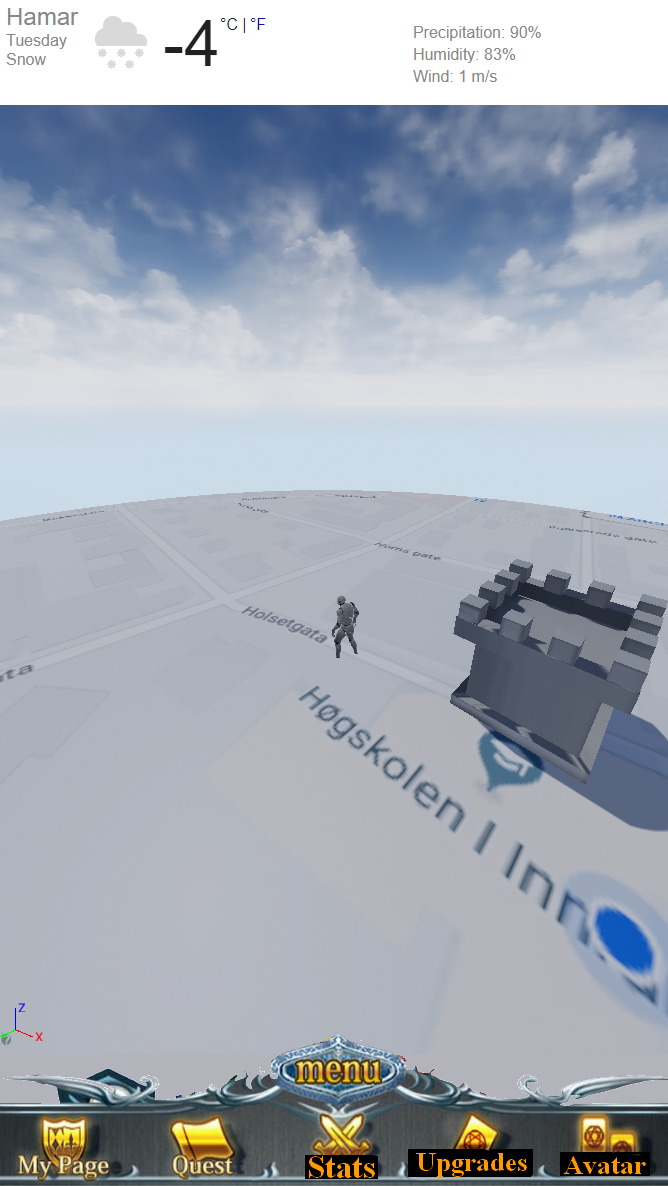
Fort Fitness however does not utilize a camera for its AR-technology, but rather the GPS on a smartphone. A virtual world is contained in Fort Fitness which is linked up to the real world’s coordinates. Like an otherwise normal GPS-app the user will be shown a map and where he/she is on the map. The user is able to place virtual structures in the map in Fort Fitness which are connected to real world coordinates. The GPS is useful as we can use it track distance walked/jogged/run in conjunction with the smartphone’s pedometer, as well as use it for gamifying purposes.


• Edvin Gammelsæter

More details – Initial startup

This app initially starts with a quiz that will determine the intensity of the training program that the Fort Fitness app will dynamically setup for the user. It will ask about the user about his/her height, weight, current activity level, intensity preferences, goals and other relevant questions. The app will then give the users its first quest which is to place the Fort in their home, which will be the users main hub.

The second quest will be to place an outpost a certain distance away from the Fort. This is the first step towards making a personal network of outposts that the user will eventually walk/jog/run between. Virtual challengers will then appear randomly at these outposts after a certain time period and a minimum quota of outposts have been fulfilled. The app is from this point fully set up for the user. Quests from this on may include moving certain outposts to a new place in order to maintain the outpost variety.

Mock-up of Fort Fitness right after placing the Fort

• Edvin Gammelsæter